QR code reader
Read a QR code from a screenshot or photograph and see its text without opening a link. Your inputs stay on your device.
LimitsSet up your task
Starting local processing
Ready. Processing stays in this browser.
2 Your result
Downloads are created from local browser memory. Check the result before replacing any original.
How to use QR code reader
Read the text hidden in a QR pattern from a screenshot or saved photo. Use it to see where a code points or recover the details of a printed invitation or network setup note.
- Choose or paste an image containing one QR code.
- Process the picture and read the decoded text in the result.
- Copy the text or save the local TXT if you want to review it again later.
Supported inputs and limits
Use one still JPEG, PNG, WebP or supported BMP image. For large photos the scanner works on a reduced copy; crop closer around a small code if it cannot be found.
How it works
A QR code can store a link, plain text or a structured value for an application. The reader returns what is encoded, including unusual characters when they are supported. A code that people call a website QR can also contain a short link or a link to a different site from the one printed on the label next to it.
For a good scan, leave the code square in the picture if possible and include its plain border. Glare, blur, steep camera angles and decoration over the blocks can make reading unreliable. For screenshots of a full page, crop a copy tightly around the code when it occupies a small part of the image. Keep just enough padding so the decoder can distinguish it from nearby text or graphics.
Look at the destination carefully if the result starts with a web address. Check with the sender when a code unexpectedly asks for payment or a sign-in. Wi-Fi, contact and calendar QR codes may contain names, credentials or event details, so treat the result as private if you copy or save it. Opening the image here does not send its content or the decoded text to another service.
Example
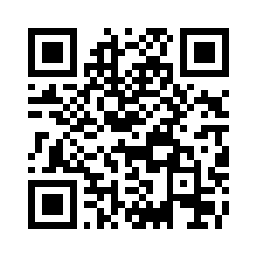
Download the practice QR PNG and scan it. The decoded text is the Goodhandover homepage address. The tool displays the address as text and does not visit it. For a QR you received, compare the full domain with the one you expect before opening it yourself. Copy the text only when you know where you will paste it.
Questions about QR code reader
Does the QR code reader open links?
It shows the decoded text and creates a local text download. It does not visit or verify the destination.
Which barcodes can the QR reader recognise?
It reads text QR codes. Retail barcodes and other formats, such as Data Matrix, are outside its scope.
Can I read a QR code that has light blocks on a dark background?
The scanner tries both polarities. Keep the full shape and its border visible if a reversed code needs a second attempt.
Related tools
Last updated